-
Drops into the build you already haveyour Dockerfile, commands, and toolchain stay as they are, in any language
-
One audit run writes the allowlist for yousee what a real build reaches, copy the generated config, switch to restrict
-
Guards the steps that fetch and run codeeach
RUNof adocker build, or a single workflowrun: -
Free and open sourceMIT licensed, free to use, with the implementation open to read
What changes
A build step can normally open a connection to anywhere. Buildcage narrows that to the requests you named, method and URL included, and records every attempt either way.
Without Buildcage
RUN npm ci && npm run build
- any host on the internet
Nothing is recorded, so nothing looks unusual.
With Buildcage
RUN npm ci && npm run build
- GET http://deb.debian.org/** PASSED
- GET https://registry.npmjs.org/** PASSED
- POST https://registry.npmjs.org/-/npm/v1/security/** PASSED
- POST https://evil.example.com/collect BLOCKED
Fetching a package is allowed; publishing one to the same host is not. All three appear in the report, whichever way they went.
That method-and-URL precision is the inspect engine, and it's the default: it reads
inside TLS with a CA generated fresh each time the proxy starts and wired into the
toolchain's own variables, with nothing left behind. When a tool won't trust that CA, set
proxy_engine: universal instead, which matches on the hostname without
decrypting.
Your allowlist comes from a real build
Start in audit mode. Buildcage watches one real build, then hands you the
configuration for the strict one.
-
Run once in audit mode
One line of configuration. Nothing is blocked yet.
with: proxy_mode: audit -
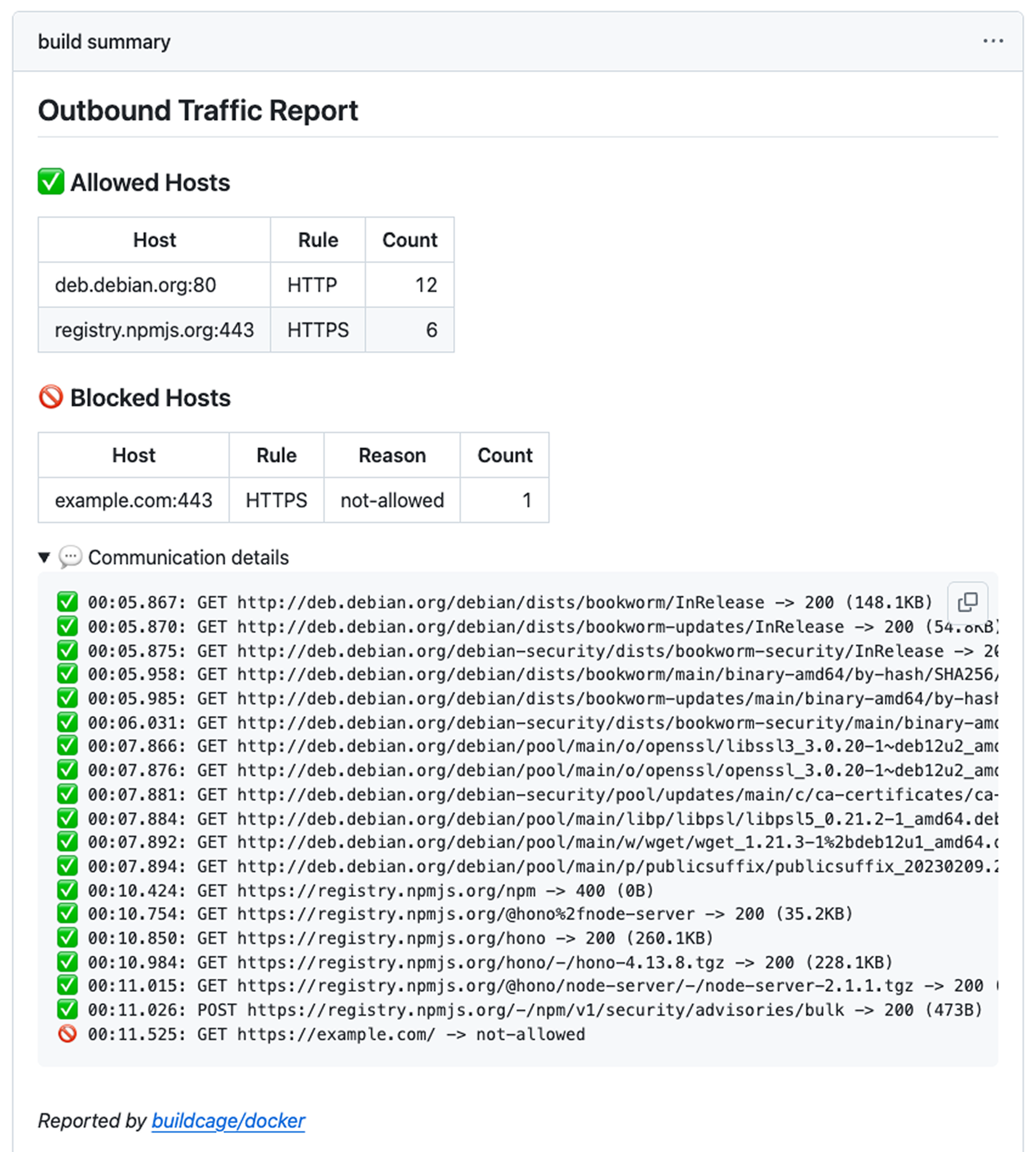
Read what your build actually reached
Every destination lands in the Job Summary.
-
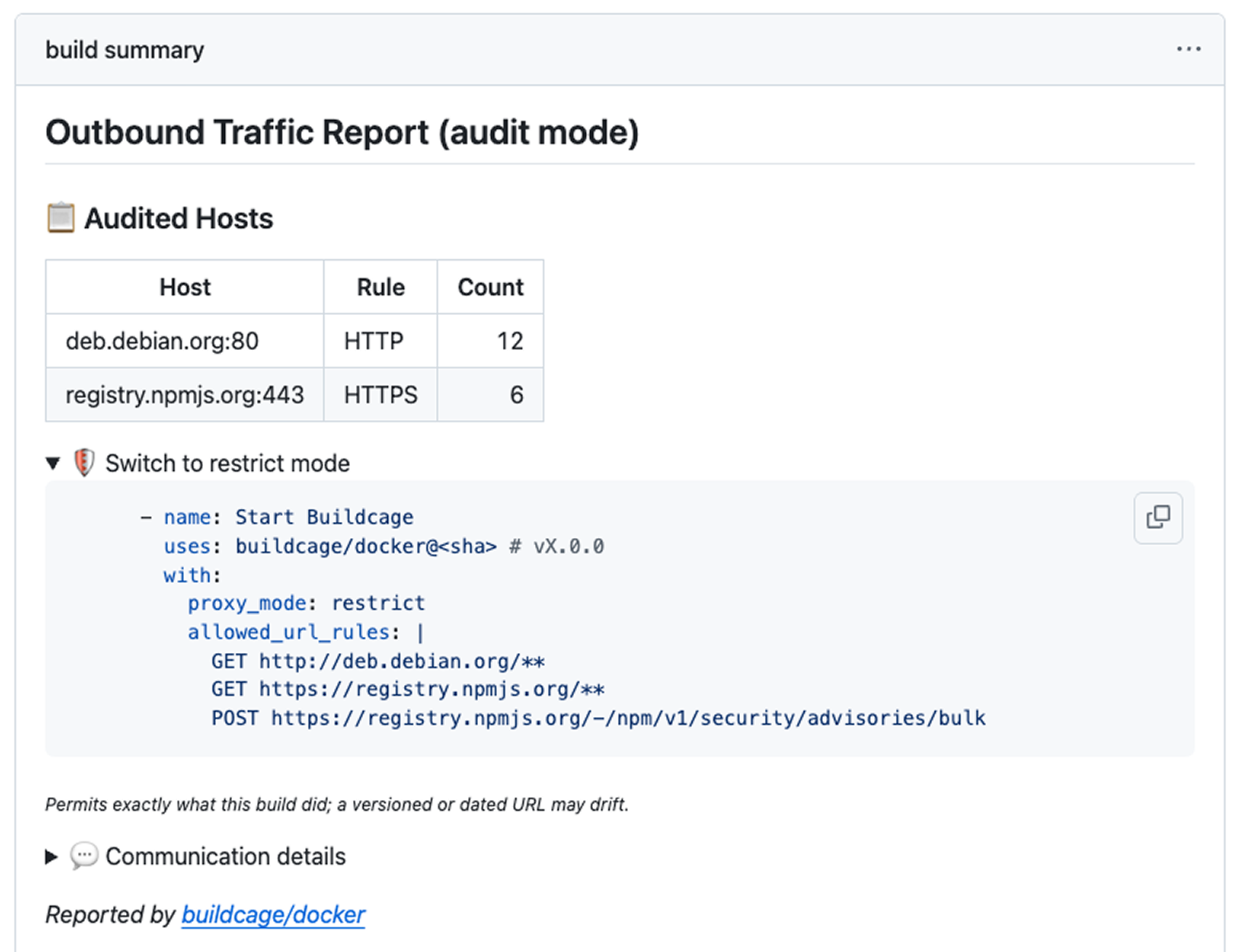
Copy the configuration it generated for you
The report carries a Switch to restrict mode section with your allowlist already filled in, built from the requests above.
proxy_mode: restrict
allowed_url_rules: |
  GET http://deb.debian.org/**
  GET https://registry.npmjs.org/**
  POST https://registry.npmjs.org/-/npm/v1/security/advisories/bulk
Two ways to use it
Same audit → restrict flow either way.
Buildcage for Docker
You build a Docker image, with no Dockerfile changes. Buildcage runs as a remote driver
for Docker Buildx and routes every RUN step's outbound traffic through a
proxy that enforces your allowlist. Nothing it does is left in the image layers.
- name: Start Buildcage in restrict mode
  uses: buildcage/docker@ecedf92e65a9cef8c91249e890a13d02ecfaf7a6 # v4.0.3
  with:
    proxy_mode: restrict
    allowed_url_rules: |
      GET https://registry.npmjs.org/**

- name: Set up Docker Buildx
  uses: docker/setup-buildx-action@37fe631027851001ddb9b187196cc803df7f5f0e # v4.3.0
  with:
    driver: remote
    endpoint: docker-container://buildcage

- name: Build
  uses: docker/build-push-action@53b7df96c91f9c12dcc8a07bcb9ccacbed38856a # v7.3.0
  with:
    context: .

- name: Show Buildcage report
  if: always()
  uses: buildcage/docker/report@ecedf92e65a9cef8c91249e890a13d02ecfaf7a6 # v4.0.3
Buildcage for run: Steps
You run a command directly in a workflow step — installing dependencies, a test suite, a
build script. The command runs in its own network namespace on the runner, keeping the
same UID and $HOME so credentials and caches set up by earlier steps keep
working. The CA that lets the proxy read the request is mounted into the sandbox's own
view of the filesystem, so nothing is written to the runner itself.
- name: Build and test with outbound restrictions
  uses: buildcage/isolated-run@71d754b1b8ee930b98c20203c58b93b5e7aa570a # v2.0.2
  with:
    proxy_mode: restrict
    allowed_url_rules: |
      GET https://registry.npmjs.org/**
    run: |
      npm ci
      npm run build
      npm run test
The sandbox covers more than the network. Every Linux capability is dropped, so
sudo or a setuid binary has nothing left to acquire. The Docker socket is
handled on its own, since membership of the docker group is equivalent to
root on a runner: the command's groups are checked before it starts, and the runtime
sockets are masked inside the sandbox either way. The system is mounted read-only, and
only $GITHUB_WORKSPACE, $HOME, /tmp and
$RUNNER_TEMP are writable. A later step in the same job isn't isolated unless
you wrap it too, so it can still read whatever the command wrote to those writable paths.
By default those writes stay on the runner (filesystem_mode: persistent);
filesystem_mode: ephemeral
(experimental) discards them when the step ends, keeping only the paths you name in
write_through:.
/usr/etc/opt/var$GITHUB_WORKSPACE$HOME/tmp$RUNNER_TEMP
The runner's filesystem the real files, as any other step sees them
filesystem_mode: ephemeral throws even those writes away when the step
ends.
How it compares
The closest tools are Harden-Runner and Bullfrog. Both attach one egress policy to the whole job, covering every step. Buildcage scopes the policy per build instead: the wrapped step gets its own allowlist, but steps outside it aren't covered — protecting a whole job means wrapping each step that needs it.
| Buildcage | Harden-Runner | Bullfrog | |
|---|---|---|---|
| Scope of the policy | One build, or one run: step |
Whole job | Whole job |
| Blocking decides on |
The HTTP method and URL (inspect), or the SNI / Host
header (universal)
|
The domain at DNS time, then the resolved IP | The domain at DNS time, then the resolved IP |
| Private repositories | Included | Enterprise tier | Included |
| Runner platform | Linux only | Linux, macOS, Windows | Linux only |
| External dashboard or account | Not required | Used for the detailed reporting | Not required |
| Also watches files and processes | No * | Yes | No |
Both allow whatever IP a name resolved to, with no further check — so on shared hosting,
one allowed domain can end up allowing every other site on that IP too. Buildcage matches
on the name instead: inspect reads the real Host, so a request
fronted behind an allowed SNI is refused, while universal never decrypts and
so narrows this without closing it. Harden-Runner is also a broader agent, correlating
network, file, and process events, and its paid plans read inside HTTPS via eBPF — for
reporting, not the block decision. Buildcage stays narrower on purpose.
* Buildcage watches no file or process events. Buildcage for run: Steps can
discard the step's filesystem writes instead, keeping only the paths you list (filesystem_mode: ephemeral, experimental).
GitHub is building an egress firewall into the runners themselves (technical preview as of September 2026): opt a job into a firewall-enabled runner image and its traffic is inspected outside the runner VM, in log or enforce mode, from one policy file per repository. A workflow that gains root inside the runner cannot switch that off, and Buildcage does not try to replace it. But one policy for the whole run is one allowlist for every step in it. Buildcage scopes its allowlist to a single build or a single step, where a rule can name a method and a URL rather than only a host, and it runs on any Linux runner with Docker, self-hosted included.
Designed to be adopted
Supply chain attacks keep getting more varied and more sophisticated: typosquatted packages, compromised maintainer accounts, malicious postinstall scripts. No single control catches all of it. Defense-in-depth is the baseline now, not an aspiration.
Buildcage is meant to be one of those layers: even if a secret gets stolen, it can't leave the build environment. Layers like that only help if people actually deploy them. Real network isolation for a build usually means someone on a security team configuring egress rules and maintaining them over time. Most projects, especially small ones, don't have that — not because they don't care, but because it's more setup than a side project or a small team has time for.
Adopting this layer should take nothing more than adding an action. The easier it is to adopt, the more systems get that protection, and the more people's personal information stays where it belongs.
run: Steps